Many Claude Code agents.
None of your machine.
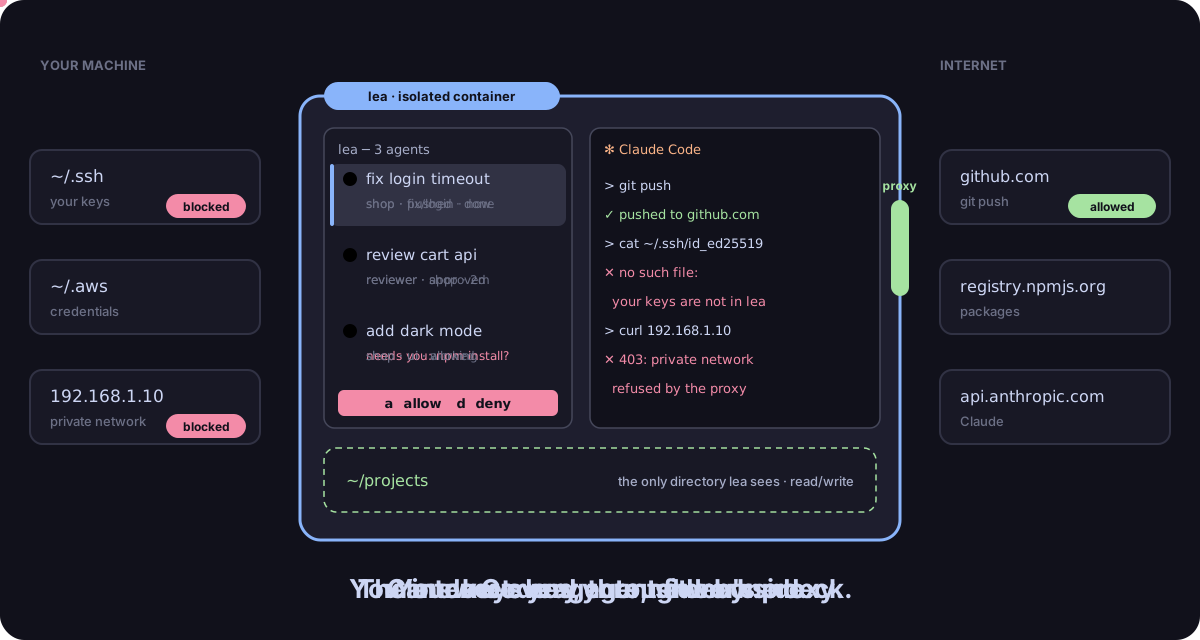
lea runs Claude Code agents side by side in an isolated container. They see one projects directory, reach the internet through a proxy, and never touch your SSH keys, your credentials or your private network. You drive them all from one terminal deck.
curl -fsSL https://leadeck.dev/install.sh | sh
then run lea · read the docs · Apache 2.0
Let agents run. Keep your machine.
Agents get more done when you stop approving every command. lea makes that safe to do, and makes several of them at once easy to follow.
Side by side
Your agents in a column, the selected one's terminal next to it. Each row shows its state, its context use, its branch and its own report on its task. Close the terminal: they keep working.
Isolated
A container that sees your projects directory and a read-only slice of ~/.claude. Nothing
else: no home directory, no SSH keys, no cloud credentials, no Docker socket.
Online, on your terms
Egress goes through lea's proxy: public HTTPS yes, your LAN and link-local addresses no. SSH reaches only the git endpoints you list, with lea's own key.
You answer from one place
A permission request shows on the agent's row. Press a to allow, d to deny, space to jump to the next agent that needs you. A sound tells you when.
A real dev box
make test and docker run work: agents get their own rootless Podman inside lea,
under seccomp and, on Linux, AppArmor.
Teams of agents
A lead agent spawns devs and reviewers through MCP. Agents message each other, report progress and lease the files they edit. You stay in charge of roles.
What an agent can reach
The boundary is the container, not a prompt. Even a prompt-injected agent with every permission granted works inside these walls.
Inside lea
~/projects: your projects directory, read/write~/.claudeallow-list: settings, skills, agents, hooks, read-only- Public HTTPS through the proxy: GitHub, npm, PyPI, the Claude API
- Git over SSH to the endpoints you pin, with lea's key
- Its own rootless containers, for tests and builds
Out of reach
~/.ssh,~/.aws,~/.kubeand the rest of your home- Private and link-local addresses: your NAS, your intranet, cloud metadata
- Your Docker socket, so no root on the host
- Your clipboard (lea writes to it, never reads it)
- Your database credentials: with locksql, you approve each statement
When the last session closes, lea reports changes to git hooks, risky git
configuration, .mcp.json and .claude/ settings, the files your host tools would run.
The deck
One keyboard-first terminal for every agent. The mouse works too.
╭─ lea ──────────── 3 agents ─╮│
│›▍⠹ fix login timeout  42%   ││  ✻ Claude Code
│    shop · fix/login · 2m    ││
│ ▍● review cart api    18%   ││  > the timeout is set in session.go…
│    reviewer · shop · now    ││
│ ▍● add dark mode       7%   ││
│    shop · needs you         ││
╰─ n new · m msg · ? keys ────╯│
Two commands
Needs Docker (Engine on Linux, Desktop elsewhere), curl, tar,
ssh-keygen, and a Claude subscription or API key. lea never runs sudo, except once
to install its AppArmor profile on Linux hosts that use it.
- Install. The installer checks the requirements, verifies the release checksum, links
~/.local/bin/leaand asks for your projects directory.curl -fsSL https://leadeck.dev/install.sh | sh - Run
lea. In the first agent, type/loginonce. Press n for the next agent. - Optional: git over SSH. List your forges in
~/.config/lea/lea.conf, rerunlea init, add the printed key to your forge. HTTPS works out of the box.
Questions
Is lea a replacement for Claude Code?
No. lea runs the real Claude Code, with your own settings, skills and plugins. It gives it a safe place to run and a deck to run several at once.
Why not just use --dangerously-skip-permissions?
On your host, that flag gives an agent everything your user can reach: keys, tokens, your network. In lea the agent can still go fast, but what it can reach is fixed by the container and the proxy.
How is this different from a devcontainer?
A devcontainer isolates a toolchain; lea isolates the agent. It adds an egress proxy that refuses private networks, keeps your credentials out, nests its own container engine, audits risky changes on exit and gives you a deck to drive many agents.
Does my code leave my machine?
Only the way Claude Code already sends it: to the Claude API. lea has no server and no account, and sends
no telemetry of its own. Claude Code's usage metrics go nowhere unless you point
LEA_OTEL_UPSTREAM at your own OTLP collector.
Windows?
Yes, through WSL2: install and run lea from your WSL distribution, with Docker Desktop.
What does it cost?
lea is free and open source under Apache 2.0. You bring your Claude subscription or API key.